


Skip to content
View in the app

A better way to browse. Learn more.

The Shed End - Chelsea FC Forums

A full-screen app on your home screen with push notifications, badges and more.

To install this app on iOS and iPadOS
  1. Tap the Share icon in Safari
  2. Scroll the menu and tap Add to Home Screen.
  3. Tap Add in the top-right corner.
To install this app on Android
  1. Tap the 3-dot menu (⋮) in the top-right corner of the browser.
  2. Tap Add to Home screen or Install app.
  3. Confirm by tapping Install.

illusions

Members
  • Joined

  • Last visited

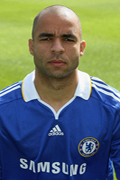
  1. the official site doesn't upload the kinds of pics of player,the images on it seems to be a series of in-match, feel upset,because i wanna DIY some facepacks for FM09
  2. I can't entirely clear the watermark ...
  3. anybody has the new season 08~09 official images of chelsea's players,like the attachment... can you give the link ,thank you so much
Background Picker
Customize Layout

Account

Navigation

Search

Search

Configure browser push notifications

Chrome (Android)
  1. Tap the lock icon next to the address bar.
  2. Tap Permissions → Notifications.
  3. Adjust your preference.
Chrome (Desktop)
  1. Click the padlock icon in the address bar.
  2. Select Site settings.
  3. Find Notifications and adjust your preference.