Mishmash Man
Members
-
Joined
-
Last visited
-
-
-
-
-
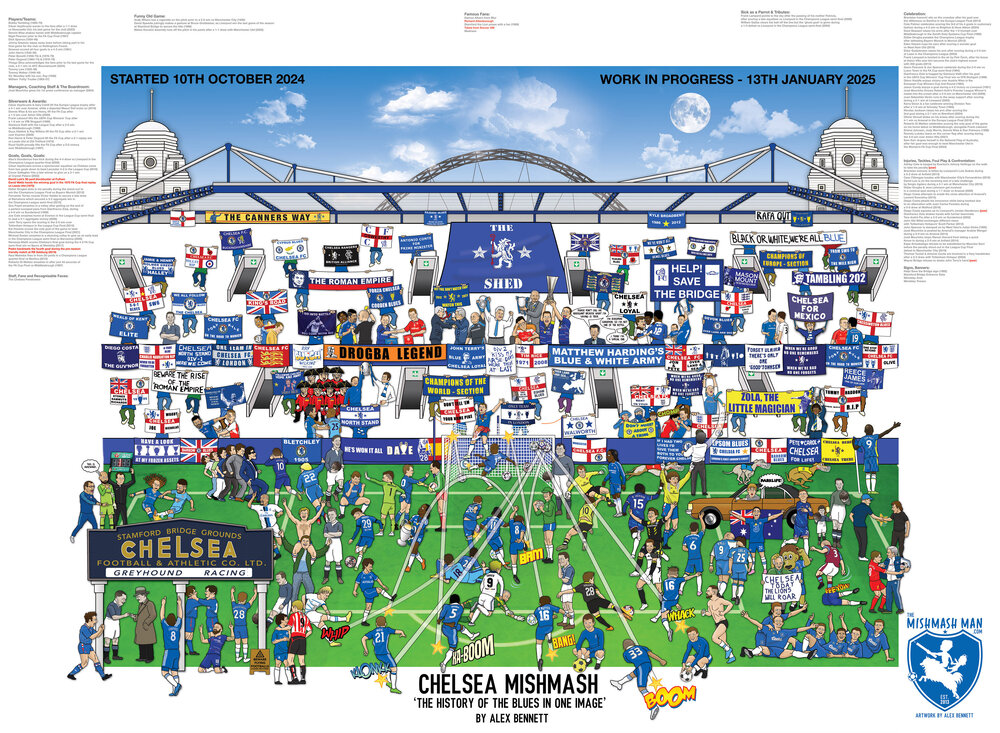
Here we are! The Chelsea Mishmash is near enough complete! May well be adding another European trophy by the end of the month.

-
-
-
-
-
-
Cheers. More prominent Certainly going in.
-
 The Rising Sun reacted to a post in a topic:
Chelsea Mishmash - The History of the Blues in One Image
The Rising Sun reacted to a post in a topic:
Chelsea Mishmash - The History of the Blues in One Image
-
-
-
Great idea, i'll certainly be adding this!
-
-
-
-
Cheers for all your feedback so far, i'm making notes of everything you say and suggest. Please note I'm not omitting anything if you can't see it. As I say it is a work in progress, I just haven't done it yet! Here's today's update. I've added the old Shed End as well as several trophy lifts.

-
-
-
Hi all, my name is Alex Bennett - an illustrator that is currently a couple of months into working on 'Chelsea Mishmash - The History of the Blues in One Image'. Please send me your ideas and suggestions on things that I need to add in. I'm looking for famous goals, celebrations, flags and banners, amusing moments etc... Basically anything that will help tell the story of Chelsea and their 120 year history. Cheers all, I'll continue to post updates as it fills up with your ideas.